Frequently Asked Questions
macOS is not letting me use the app because of Music Automation Permission 🙀
When you start QuakeNotch first time, macOS will ask you to give Apple Music Automation permission to QuakeNotch.
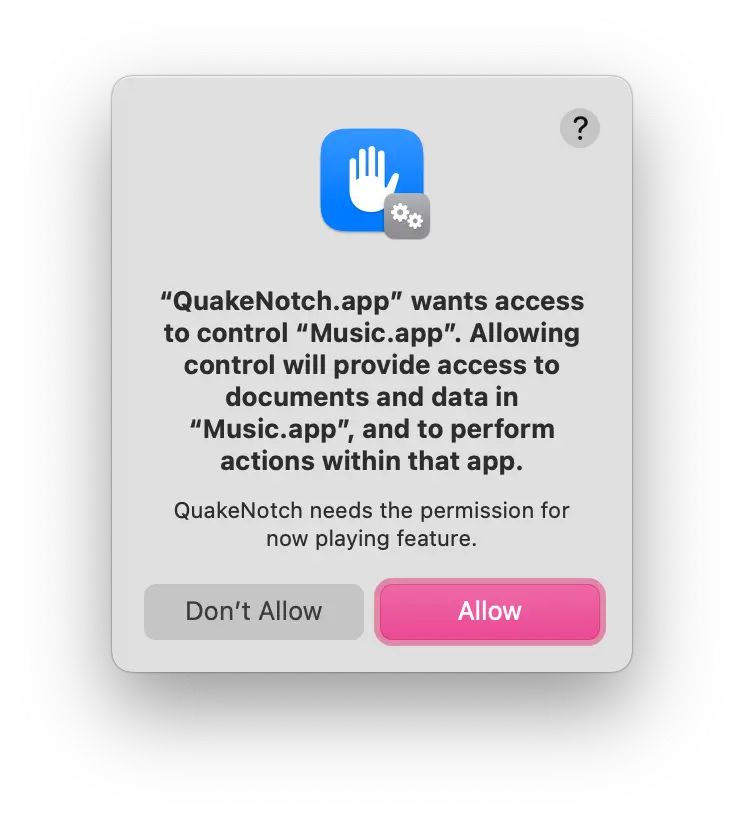
After enabling this too, restart QuakeNotch and you'll be able to use it without any issues.
If you accidentally denied the permission, you can enable it from System Preferences > Security & Privacy > Privacy > Automation > Apple Music > QuakeNotch. In this case, QuaoeNotch will guide you to give the permission.
QuakeNotch is frozen / not responding! What should I do? 😳
QuakeNotch has Apple Music integration and when Apple Music is frozen and not responding, QuakeNotch can freeze too.
QuakeNotch 3.0 includes a circuit breaker that automatically detects when Apple Music is unresponsive and stops making calls to it, so freezes are much rarer now. If it does happen, just quit QuakeNotch and Apple Music from the Dock or Force Quit them from Apple Menu > Force Quit.
After that, just start QuakeNotch again and it will work perfectly.
Also, if you have an app like NoTunes, please quit it too, because these apps can interfere with Apple Music and cause such issues.
Is the app stable enough? 🤔
Looks like yes; the app is stable enough. I'm always testing the app on different devices and macOS versions.
QuakeNotch 3.0 is the most stable version yet, with improved performance management and circuit breaker protections. If you encounter any issues, please let me know.
It's purrfect but, will you make more amazing features? 😍
Yes! I'm always working on new features and improvements. If you have any suggestions, feel free to contact me.
I love the app! How can I support you? ❤️
Thank you! You can support me by buying the app and also sharing it with your friends or commmunities.
You can also donate me any amount on my Patreon.
Support on Patreon
patreon.com/evrenselkisilik
Bitcoin
1A3NkkFEMFc2wq74GGRXdzrsEn42Ts1ajm
ETH, USDT/USDC (ERC20)
0xDDD5e5029F4d1CA54461abCF558Cb6dcAD6Df3CB
Monero
8A8HWvGp8d3Qf8Qn1ei97RXPJiQYodvBxLSaPbnLEKAZ2pjnAbmNLn59HNPKirrAmKTfNEfjbobdi33zV1CwDQ7qRLxiZvR
Troubleshooting and Support 🛠️
If you have a tweaker app like NoTunes or similar apps that control Apple Music, please quit them while using QuakeNotch. These apps can interfere with Apple Music and cause QuakeNotch to misbehave.
If the app is started to work weirdly, just restart it. Apple Scripts and events can sometimes cause issues, so restarting the app can help. There is no a known issue but if you encounter any issues, please let me know.
If it keeps asking for permission, close QuakeNotch, open Terminal app and enter this command:
sudo tccutil reset All MeowingCat.QuakeNotch
If you have any issues or questions, please feel free to contact me on my Patreon and also on my Discord Server
You can also donate me any amount on my Patreon.